
Honda CR-V Software Update Guide: Check, Fix, Install (2017–2026)
Here’s the thing most CR-V software guides skip: “software update” means three different things on this SUV.
Only one of them is something you can do from the driver’s seat. And whether you can do it at all depends heavily on your model year and trim.
I went through Honda’s owner’s manuals for every recent CR-V, Honda’s service bulletins filed with NHTSA, and the forum threads where CR-V drivers describe exactly where the process breaks. This is what I found.
Quick Answer: Can You Update Your CR-V Yourself?
| Model year / screen | DIY update menu? | How updates arrive |
|---|---|---|
| 2017–2022 (5th gen), Display Audio | No | Dealer only, usually through a service bulletin |
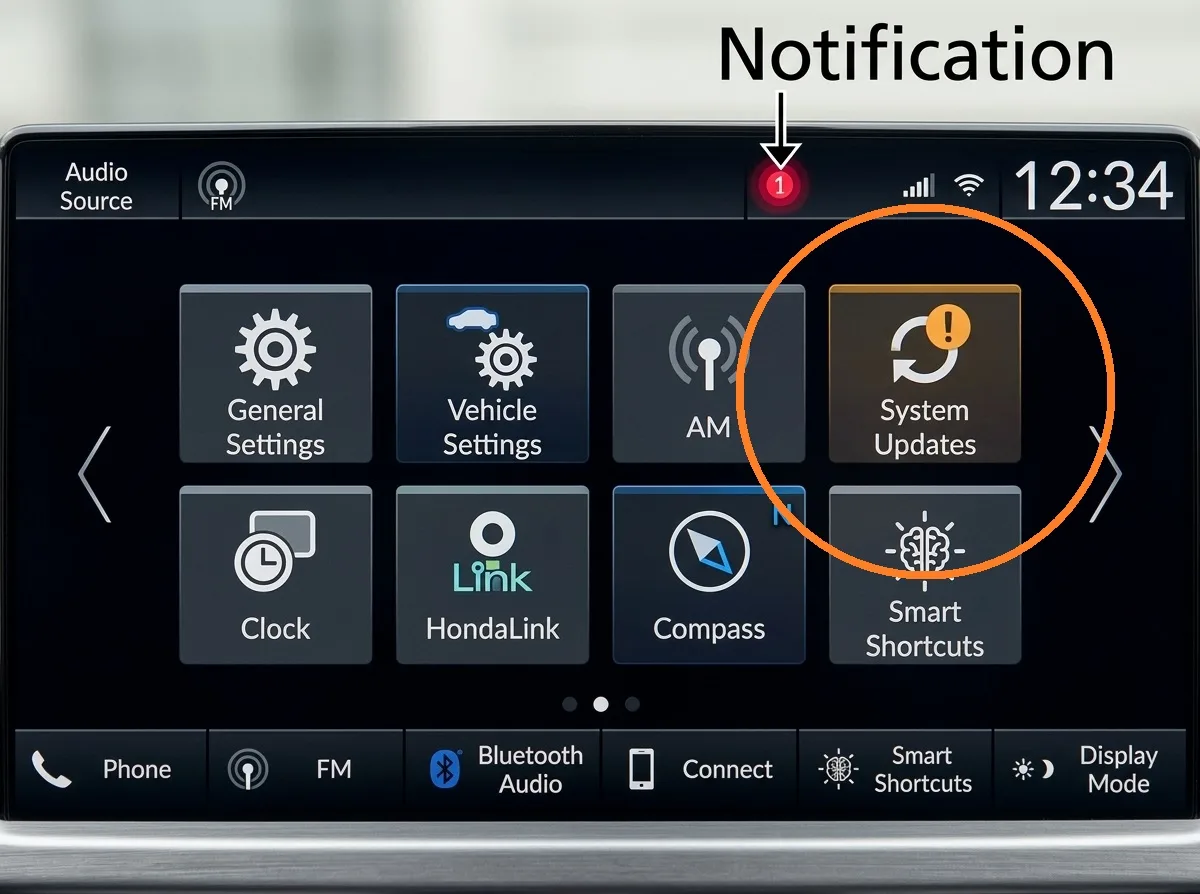
| 2023–2025, touchscreen with a “System Updates” app | Yes | Wi-Fi, USB drive, or built-in cellular (some hybrids) |
| 2026, standard 9″ touchscreen | No menu in the car | Dealer, or a notice through HondaLink |
| 2026 Sport Touring, 9″ with Google built-in | Yes, mostly automatic | Wi-Fi or built-in cellular, installs with the car off |
| Any year: engine, hybrid, airbag, and safety modules | Never | Dealer only, with Honda’s diagnostic tools |
If you only remember one thing: if there’s no System Updates icon on your home screen or under All Apps, your CR-V can’t be updated by you. Stop hunting for a hidden button.
The Three Kinds of CR-V Software Updates
1. Infotainment (head unit) firmware. This covers the touchscreen, Bluetooth, Apple CarPlay, and Android Auto behavior. It’s the only type owners can install on 2023-and-newer models.
2. Navigation map data. This applies only to trims with factory navigation. It’s separate from the firmware, and Honda says new map data usually comes out once a year.
3. Vehicle control module software. That means the engine computer (PGM-FI), hybrid system, airbag unit, grille shutter controller, and driver-assist systems. These get reflashed at a dealer with Honda’s tools. No CR-V lets you touch these from the screen.
Most frustration I see online comes from mixing these up. Someone reads “Honda pushes software updates” and expects a fix for a grille shutter code from the touchscreen. That’s not how it works.
Step 1: Check Your Current Software Version
Before updating anything, write down your current version. You’ll need it if something goes wrong, and it shows whether an update actually installed.
On 2023–2025 models there are two ways to find it:
- Home – System Updates – Settings – Version Status (Honda’s official path)
- Home – General Settings – System – About – Build Number (a faster shortcut CR-V forum regulars use)
The build number looks like 75FA-0075-121. For reference, a 2025 EX-L on CRVOwnersClub moved from 75FA-0075-121 to 75FA-0085-121 in October 2025. Based on the forum threads, that looks like the first update this unit received in roughly two years.
Expect updates to be rare. Honda doesn’t push monthly patches like Tesla does.
On 2026 models with Google built-in, the menu is Home – System Updates – Settings – Control Unit Versions. You’ll find Update History in the same place.
How to Update a 2023–2025 CR-V Over Wi-Fi
This is the procedure from Honda’s 2023, 2024, and 2025 CR-V and CR-V Hybrid owner’s manuals. The steps are the same across those years.
Connect to Wi-Fi first
- Press the Home button.
- Select System Updates. If you don’t see it, look under All Apps.
- Select Settings – Connection Setup – OK.
- Pick your network and enter the password.
- Check the box “Use this network to automatically download system updates.”
- Select Connect.
You can also reach the same Wi-Fi screen through General Settings → Connections → Wi-Fi. The car has to be parked. The menu won’t let you do this while moving.
Download and install
- Go back to System Updates and select via Wireless.
- Select Download. Accept the prompt if one appears.
- Choose Install Now or Install While Vehicle Off.
- A confirmation appears when the update finishes.
A tip on step 3: Install While Vehicle Off is greyed out when the 12-volt battery is low. Honda blocks it on purpose so a long install doesn’t leave you with a dead battery. If you see it greyed out, use Install Now with the engine running (or the hybrid in ON mode).
If you’d rather not think about it again, go to System Updates → Settings → Automatic Download and enable it for your home network.
How long it takes
Honda doesn’t publish install times. The real-world reports I collected range from 1–2 minutes (an update that had already downloaded) to about 8 minutes for a full Honda infotainment update, according to one YouTube creator who timed it.
Plan on 15 minutes parked. Don’t start it in a drive-thru line.
How to Update a CR-V With a USB Drive
The USB method is the backup when Wi-Fi won’t cooperate. It goes through Honda’s official portal at usb.honda.com.
What you need:
- A USB drive formatted FAT32 with at least 8 GB free
- A computer with internet access
- About 30 minutes split between the car and the computer
The process:
- In the car: Home – System Updates – Other Methods – Via USB, then plug in the drive. The car writes a vehicle data file to it.
- On your computer: go to usb.honda.com and upload the file named update_by_usb.json. Honda says the update check can take up to 10 minutes.
- Download the update and copy it into the folder the car created on the drive.
- Back in the car: System Updates – Other Methods – Via USB, plug in the drive, and select Install Now.
- Upload the report file the car writes back to usb.honda.com to close out the process.
Two mistakes that trip people up: leaving old inventory or update files on the drive (Honda’s manual says to delete them first), and closing or refreshing the browser mid-download.
2026 CR-V Sport Touring (Google Built-in): Mostly Automatic
The Sport Touring’s Google built-in system works differently. It checks Honda’s servers on its own, about once a week over Wi-Fi or every four weeks over the built-in cellular connection, according to Honda’s System Updates terms in the 2026 manual.
When an update is ready, a prompt appears on the screen. You select Agree to Update, and the install runs after you turn the car off.
Honda’s 2026 manual lists the conditions that can stop the install from starting:
- The shifter isn’t in P
- The car is sending an emergency notification
- The 12-volt battery is depleted
Next time you power on, a results screen tells you whether it worked. You’ll find the record under Settings – Update History.
To use your home Wi-Fi instead of cellular data, go to General Settings – Connections – Wi-Fi – Options, then tick the update box next to your network.
2026 CR-V With the Standard 9-Inch Screen: There’s No Update Menu
This one has caught 2026 buyers off guard, and I couldn’t find another guide that mentions it.
In Honda’s 2026 CR-V owner’s manual, the System Updates section only appears under the Google built-in system. The standard 9-inch touchscreen section has a reboot procedure and nothing about updates.
The forums back this up. A 2026 Sport-L Hybrid driver on CRVOwnersClub couldn’t find Wi-Fi settings or an update screen. His dealer’s tech then confirmed the standard unit has neither, and that updates go through HondaLink and the dealer.
So if your 2026 doesn’t have Google built-in, don’t waste an evening looking for a button that isn’t there.
Why CR-V Wi-Fi Updates Fail (and the Fixes That Work)
Honda’s instructions look simple. The forum threads tell a different story. Once you read through them, almost every failure falls into one of five buckets.
Wireless CarPlay or Android Auto is holding the Wi-Fi
This is the big one, and it makes sense once you know how wireless CarPlay works. Bluetooth only handles the handshake. The actual screen data runs over a direct Wi-Fi link between your phone and the head unit.
So while your phone is connected, the head unit’s Wi-Fi is already busy. Asking it to join your home network at the same time often just fails.
That’s exactly what a 2025 CR-V driver ran into: the screen said Android Auto had the connection. He switched his phone off, and the update downloaded right away.
Turn off your phone’s Bluetooth and Wi-Fi (or the whole phone) before starting the update.
Your network needs a login page
Honda’s manual says it plainly: the update won’t work on Wi-Fi that needs a browser login or a terms-of-use agreement. That rules out most hotel, airport, coffee shop, and apartment-complex networks.
Use your home network or your smartphone hotspot.
Your router can’t reach the driveway
A weak garage signal will start the download and then drop it. Honda says an interrupted download picks back up the next time Wi-Fi connects, so you won’t lose progress. It just won’t finish.
Move the car closer to the router, or use a hotspot parked right next to it.
The dealership lot trick
The oddest fix I came across: a CR-V driver who failed for months at home finally parked outside his Honda dealer’s service bays, accepted the Wi-Fi prompt, and finished in 1–2 minutes. The screen confirmed “Software is up to date.”
Your results will depend on whether your dealer’s guest Wi-Fi has a login page. It’s still worth a try during your next oil change.
The screen is frozen or acting strange first
Reboot before you update. On 2023–2026 models, Honda’s manual says to press and hold the Home button, then select Reboot.
On YouTube you’ll find videos showing button combinations that open Honda’s hidden diagnostic menus. The creator of one popular video warns viewers to stay out of those menus if they don’t know what they’re doing. I agree. You don’t need them for a reboot.
Dealer-Only Updates
Control module updates are listed in Honda’s service bulletins. These are some recent CR-V examples on file with NHTSA:
| Bulletin | Models | What it fixes |
|---|---|---|
| 19-066 | 2017–2019 CR-V EX, EX-L, Touring | Display Audio screen dims or goes dark on its own (USB update, about 5 minutes) |
| 23-017 | 2023 CR-V Hybrid | Active grille shutter controller error that can set code P060A |
| A23-021 | 2023 CR-V | LKAS warning light comes on when driving in reverse (camera software) |
| A23-022 | 2023 CR-V | Adaptive cruise cancels with a “Collision Mitigation Braking System problem” message |
| 25-085 | 2026 CR-V LX, EX, EX-L | Airbag (SRS) unit doesn’t record brake data in the event data recorder |
| 26-088 | 2023–2026 CR-V Hybrid | Engine software update to better manage the electric water pump and engine temperatures |
The last one is current. Honda announced the 26-088 hybrid update on July 24, 2026, and said it would start notifying owners in early September 2026. If you drive a 2023–2026 CR-V Hybrid, check your mail and your VIN.
Bulletin updates like these are covered under warranty. Labor times run about 0.2 to 0.4 hours for most of them, so it’s a short visit.
Why your dealer may refuse to “just check for updates”
This comes up constantly on the forums. A 2018 Touring driver asked for all available updates during a recall visit and was told the dealer won’t update software unless there’s a reported problem.
Honda’s bulletins explain why. They say warranty reimbursement isn’t allowed for routine checking or installation of software updates. The dealer won’t get paid for a general update check, so many don’t do one.
How to ask the right way:
- Describe the specific symptom (“my screen reboots twice a week,” “my adaptive cruise cancels on the highway”).
- Ask them to run your VIN for open campaigns and product updates.
- Ask for the bulletin number on your repair order.
You can check your VIN yourself on Honda’s owner site and on NHTSA’s recall lookup before you go. If you’re tracking the bigger picture, my CR-V recall history covers every campaign from 2023 to 2026.
2017–2022 CR-V Owners: The Hard Truth
The 5th-gen CR-V’s Display Audio was never given a DIY update tool like the 2023+ system has. Honda’s owner site has System Updates guides for the Accord, Pilot, and Passport from those years. I couldn’t find one for the CR-V.
Updates came through dealer bulletins like 19-066, installed from a USB stick using the head unit’s service mode. And 19-066 only fixed the screen-darkening problem. A fuller head unit update did exist, but one forum member said it took weeks of phone calls before his dealer would get it.
Two things people keep asking about:
- Can a 2022 get the 2023 software? No. The 6th-gen system is completely different hardware.
- Will Honda add wireless CarPlay to older models? Honda tested the idea with a customer survey in 2020. As far as I can find, a paid upgrade never shipped.
If your 5th-gen screen goes black or freezes, press and hold the power button to get the reboot option.
Some 5th-gen drivers go further and pull the negative battery cable for 15 minutes. From a mechanical standpoint, I’d keep that as a last resort. It resets every module in the car, not only the radio, and some systems have to relearn afterward.
Things Nobody Tells You Before Updating
A factory reset knocks HondaLink offline. Honda’s 2025 manual says that after a Factory Data Reset, HondaLink goes offline until you set it up again. Try a reboot first and save the reset as a last resort.
Don’t trust version numbers from AI chatbots. I saw a forum post sharing a “latest version” an AI tool had produced, complete with release notes. That update never showed up on his car. Your car’s own System Updates screen is the only source that counts.
A healthy 12-volt battery matters more than you’d think. Anyone who has dealt with module programming knows the rule: a voltage drop in the middle of a write is what bricks a control unit. Honda’s bulletins warn that a module damaged by low voltage during an update isn’t covered by warranty. A weak 12V battery also blocks the overnight install option.
If your battery is past four years old, test it first. My CR-V battery size and replacement cost guide has the specs.
Updates rarely add features. On a CR-V, expect bug fixes and better phone stability, not new apps or new screen layouts.
My Take
If you have a 2023–2025 CR-V, turn on Automatic Download for your home Wi-Fi and forget about it. When a manual update stalls, the fix is almost always the phone. Disconnect it and try again.
When I help a friend look over a used 2023-or-newer CR-V, this goes on my checklist: open Update History and Version Status. It takes 30 seconds, tells you whether the car has ever been updated, and gives you a version number to bring up with the dealer later.
And for anything beyond the touchscreen, like a check-engine light, a grille shutter code, or cruise control dropping out, skip the menus. That’s a dealer visit with a specific complaint, a VIN check, and a bulletin number on the paperwork.